From spec to shipped code: rebuilding how a 60M-user product gets designed

From spec to shipped code: rebuilding how a 60M-user product gets designed

How we rebuilt the product development loop on Microsoft's AMC with agentic automation, taking repetitive work off designers, PMs, and engineers so the team could ship faster.

How we rebuilt the product development loop on Microsoft's AMC with agentic automation, taking repetitive work off designers, PMs, and engineers so the team could ship faster.

Direct responsabilities

Product Strategy · End-to-End Product Design · Workflow Automation · Cross-Geo Collaboration

Hands On Contributions

UX & Interaction Design · Visual Design · UX Writing · AI Prototyping · Agent Workflow Design · React Handoff

Team

2 Designers

6+ PMs

15+ Engineers

5+ Cross geo teams

Timeline

June 26 - Ongoing

What is AMC?

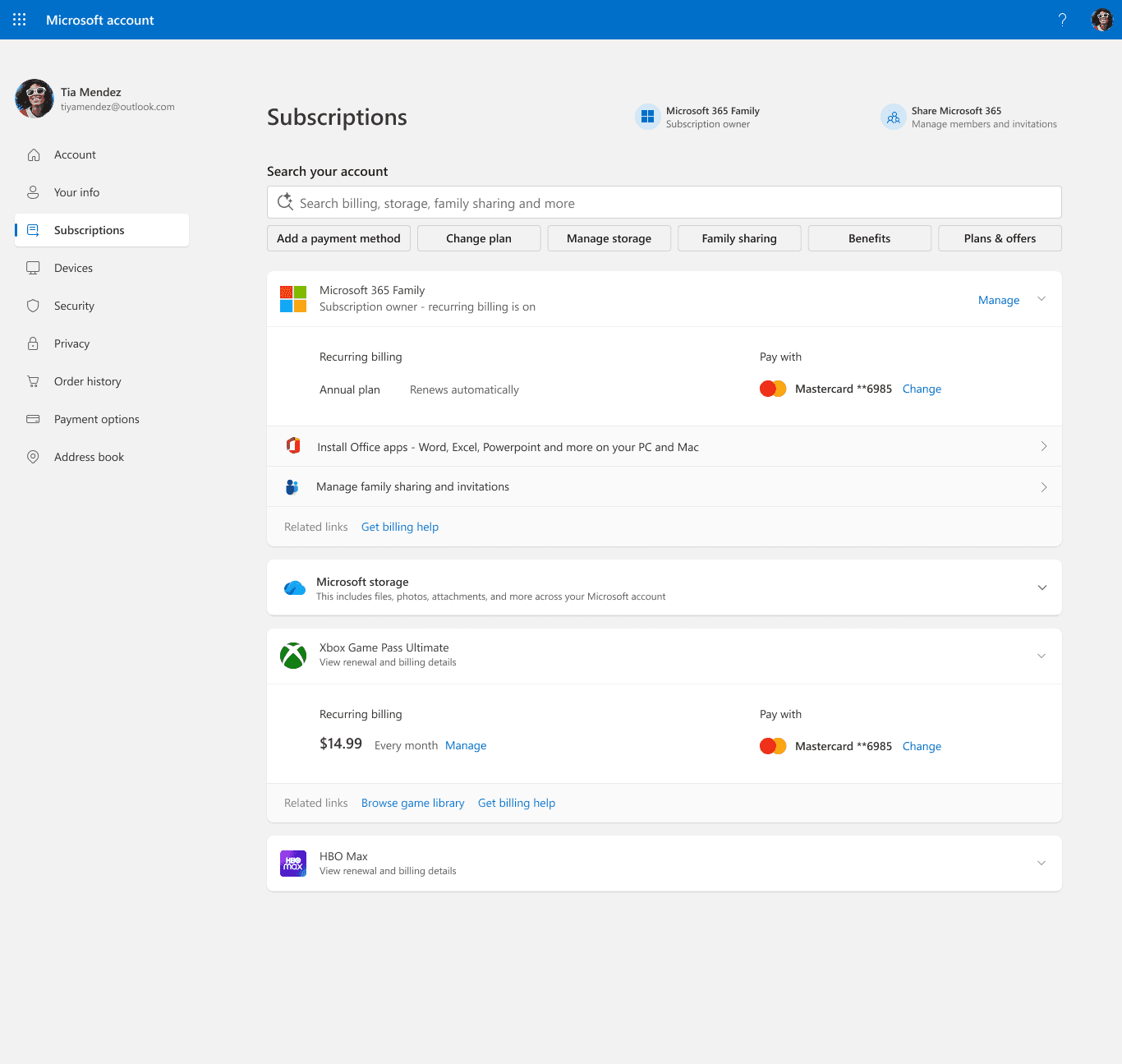
AMC (account.microsoft.com) is the home of the Microsoft account, where consumers manage subscriptions and payments across Microsoft 365 and Xbox & other 3rd party subscriptions. It's a key surface for retention and acquisition.

What I did
AMC was my first product at Microsoft. In three months, I:

Shaped the product: owned design across parallel workstreams (Homepage and Subscription redesign, M365's new visual identity, Express Checkout, device self-repair), working with PM and engineering teams across multiple teams around the globe.

Changed how we built it:Created an agentic workflow from PM spec to production code, cutting repetitive work so the team shipped faster.

Where I started

I joined Microsoft in June 2026 and was on AMC within a week. The product had just moved from Redmond to India, and the designers who knew it had left.

I was given two briefs. The first was to work closely with PMs and engineers on AMC’s design work items. The second, running in parallel, was to build an AI workflow that made design delivery faster, producing production-ready code and prototypes that developers could build on directly.

What I found:

  • Design files scattered and duplicated, with no history.

  • Components tied to old design systems, many without auto-layout.

  • Pages owned by different teams, updated unevenly.

  • A lot of upsell, while basic customer problems still needed care.
I did not rush to fix one thing. I spent time trying to understand the product and how work actually moved through it. I talked closely with product owners, PMs and engineering teams. I also learned how CELA (Corporate, External and Legal Affairs), Marketing and Accessibility shaped each release, since every design passed through their reviews before it shipped.

What the team was struggling with

Work moved in a straight line. A PM wrote the spec, design turned it into Figma screens, and those screens went through reviews with CELA, Marketing and Accessibility. Then engineering rebuilt everything from scratch in code. Each step waited on the one before it, and every handoff lost some context.

THE PROCESS, WITHOUT THE JARGON

A lot of finding. Then a lot of making.

References, versions, and decisions lived in different places.
Find the context

Find the current file, recover past decisions, and work out which components to trust.

First experiment: Figma Make

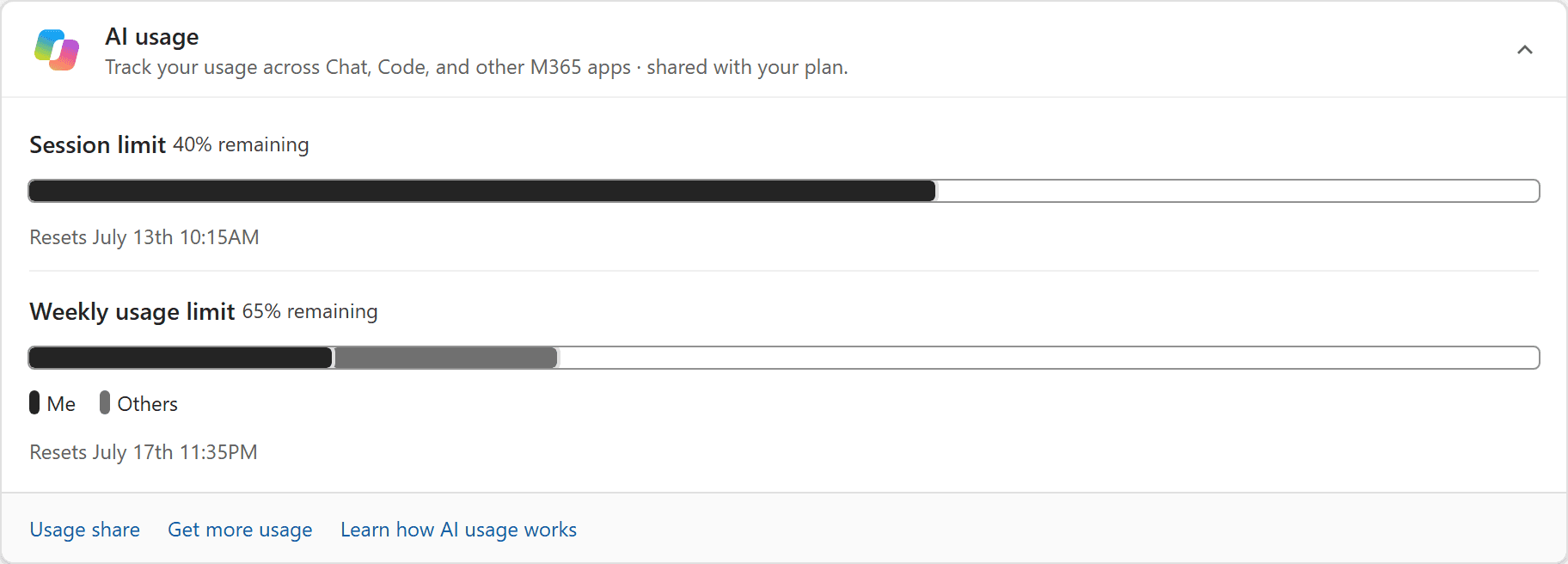
My first test case was a real brief: an AI Usage Card that helps customers understand their AI usage across Microsoft products. The PM shared a requirements deck, and I began where most designers would, in Figma Make.

I connected our existing design libraries to one file and tried generating several AMC screens: the homepage, Subscription, and AI Usage. I wanted to see whether the tool could handle a real product, not just a blank canvas.

It couldn’t. The outputs looked close but broke under inspection. Tokens were often unbound, components didn’t behave like their library versions, and nothing matched what was actually live in code.

What the failure taught me

Better prompts weren’t the fix. The design files and the codebase described two different products. Any AI working from Figma would faithfully reproduce that mismatch.

So I changed the starting point. After talking with engineers, I got access to the frontend codebase and began working locally in VS Code. GitHub and coding were new territory for me, but the code was the one source that matched what customers saw.

Before building anything, I organized the requirements, references and assets into a knowledge base, so the workflow had a single, reliable foundation to draw from.

A small team of focused helpers.

One finds components. Another builds the draft. Others check the fit, review accessibility, make a targeted correction, or package the result. I still review the work and decide what needs attention.

A human-led loop.

01Brief
02Agent
03Review

Feedback returns to the right role.

Component matcher

Reuse first.

Agent action
Find existing components.
My decision
Choose the right fit.

Choose a role

Component matcher. Reuse first.

Reduced motion: choose a role manually.

Make the draft faster. Keep the decisions human.

The workflow grew through trial, review, and correction. We reused the frontend code, TwoUI components, tokens, and business rules instead of asking AI to invent a new interface every time.

THE PROCESS, WITHOUT THE JARGON

A lot of finding. Then a lot of making.

References, versions, and decisions lived in different places.
Find the context

Find the current file, recover past decisions, and work out which components to trust.

The experiment: AI Usage Card

With the knowledge base in place, I ran the same brief again: the AI Usage Card. This time the workflow drew on the real codebase instead of Figma.

Existing AI usage prototype card with session and weekly limits, reset details, and Me and Others legend labels.
Actual AI usage prototype with illustrated source regions.

QuotaBar

Preserve the outlined track, separated segments and pill-shaped legend, not just the colors.

Source notes

Known: The recorded fidelity correction specifically names QuotaBar anatomy. Matching colors alone did not preserve the component.

Illustrated: The association is illustrated here. No prop names, supported values or token values are being inferred from these pixels.

The source uses existing TwoUI components, compiled product tokens and catalog mapping; this view neither reads a repository nor mounts production components.

Hover, tap or focus a region. Arrow keys move between regions; Home and End jump to the first and last.

Region 2: Quota anatomy. QuotaBar responsibility selected.

The difference was clear. The workflow built every section of the card with real Two UI components, the same ones engineering ships in production. The result wasn’t a mockup that resembled the product. It was the product’s own building blocks, assembled to the PM’s requirements, and developers could build on it directly instead of rebuilding it.

Three states. One working card.

Four weeks became about one

That’s the time from brief to a completed design and code handoff, as confirmed by the PM team. It doesn’t measure time to release.

  • Planned work finished a month ahead of schedule.

  • Accessibility review passed on the first attempt, after an agent pre-check.

  • PMs and engineers could make their own mockups.

  • Engineering received working first-draft code, with feasibility already tested.

A better workflow can still be a work in progress.

A clearer baseline. Track the same start and finish points, review rounds, and setup effort from the first run. A useful estimate is good; a repeatable comparison is better.

A tighter code handoff. Make the difference between supported APIs, proposed changes, and prototype shortcuts impossible to miss. A good-looking draft should not hand engineering a guessing game.

A decision log that survives the meeting. Reporting is still scattered across email and time zones. Documentation and communication are the next part I would tackle.

Enter password to view case study

Remember me