Microsoft / AMC agentic workflow
Built by agents.
Refined by judgment.
Inspired by the Rolls-Royce production process, I built an agentic design workflow for Microsoft account experiences. Agents produced and checked the draft; I marked what needed attention and reviewed the corrections.
The first artifact: AI usage

The original prototype, grounded in existing TwoUI components.
My role
Workflow design, agent collaboration and human review
Built with
VS Code, GitHub Copilot, TwoUI and Figma
The work
An inspectable workflow, applied to Smart Search
The inspiration / Rolls-Royce
The white-circle moment.
My starting point was the Rolls-Royce production process. The detail that stayed with me was the human inspection: someone marking small dents and surface imperfections with white circles so they could be corrected.
I borrowed that idea for design. Specialized agents could build a draft, but a designer needed to inspect it, mark what needed attention and review the correction. Producing the work was not the same as approving it.
01 / Establish the standard
Give the line a shared foundation.
I started in VS Code and connected Copilot to TwoUI’s components, tokens and rules. These references gave the agents a shared foundation and gave me something concrete to review against.
The shared specification
Components, tokens and rules.
713
Catalog entries
436
Compiled tokens
Rules + references
Layout, content, states and review
Project snapshot counts. Source lookup, not model training.
02 / Organize the work
Six roles. One shared draft.
I organized the workflow around six responsibilities. A PM supplied the brief; focused agents built and checked the draft. I reviewed the result and directed the next correction.
A human-led loop.
Feedback returns to the right role.
Component matcher
Reuse first.
- Agent action
- Find existing components.
- My decision
- Choose the right fit.
Choose a role
Component matcher. Reuse first.
03 / Make the work inspectable
Trace a detail to its source.
Inspection needed more than a finished-looking screen. I added a way to trace a region back to the product’s components and rules, so I could see what the draft was built from.
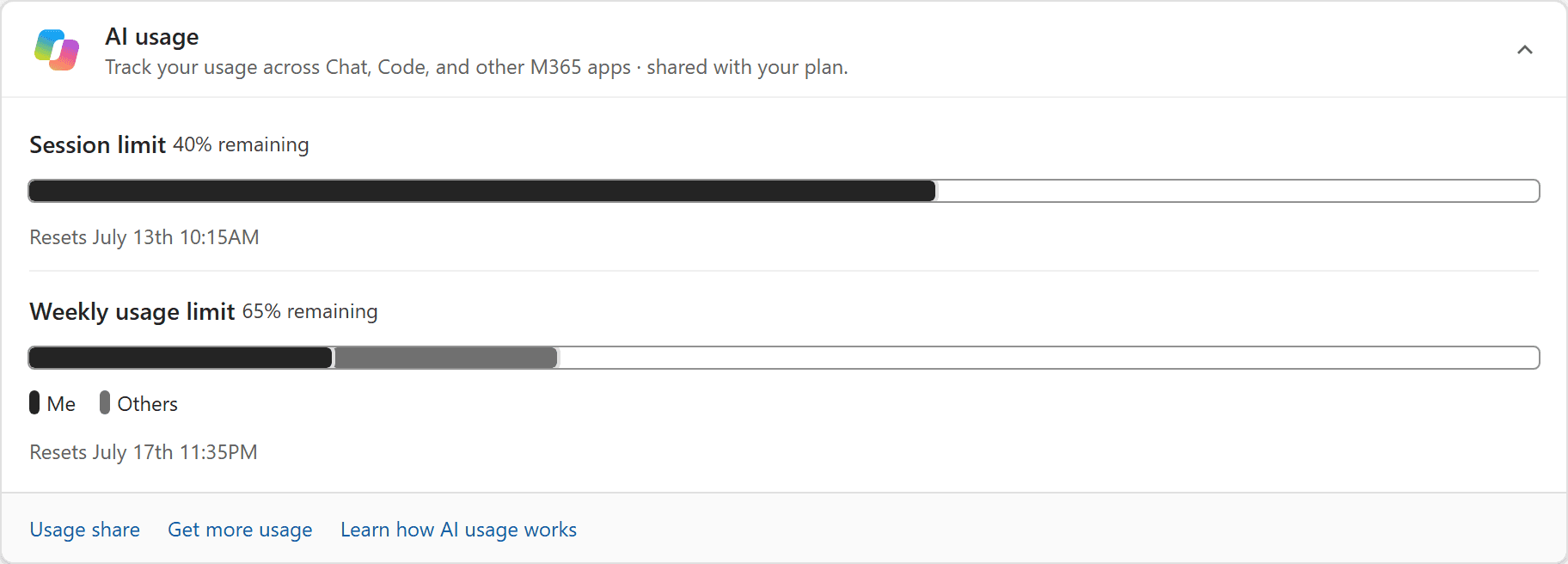
QuotaBar
Preserve the outlined track, separated segments and pill-shaped legend, not just the colors.
Source notes
Known: The recorded fidelity correction specifically names QuotaBar anatomy. Matching colors alone did not preserve the component.
Illustrated: The association is illustrated here. No prop names, supported values or token values are being inferred from these pixels.
The source uses existing TwoUI components, compiled product tokens and catalog mapping; this view neither reads a repository nor mounts production components.
Hover, tap or focus a region. Arrow keys move between regions; Home and End jump to the first and last.
Region 2: Quota anatomy. QuotaBar responsibility selected.
04 / Find the imperfection
A small miss needed a closer look.
The first quota bar lost the outlined track and separated segments. That was a specific defect to correct, not a reason to regenerate the whole screen. I corrected the component, then checked the surrounding states.
Context changes the action.
Owner: manage the plan.
Payment issue: recover first.
Low allowance: show the reset.
BeforeReconstruction
AfterPrototype
Match the track, segment joins and legend, not just colors.
Review notes
- Track outline: Replaced a filled background with an outlined, open track.
- Segment joins: Replaced touching, square segments with separated segment treatment.
- Legend shape: Replaced square legend marks with the original pill-shaped marks.
Highlight outlines explain the recorded correction. Inspect the existing component's source styling before implementation; usage values are sample interface content, not project metrics.
05 / Mark, correct, reinspect
My version of the white circle.
I marked the region, named the issue and asked for a bounded correction. Then I reviewed the result. Approved corrections became reusable guidance for the next draft, rather than another vague request to make it better.
Accessibility checks informed review; they did not replace it.
Weekly usage limit65% remaining
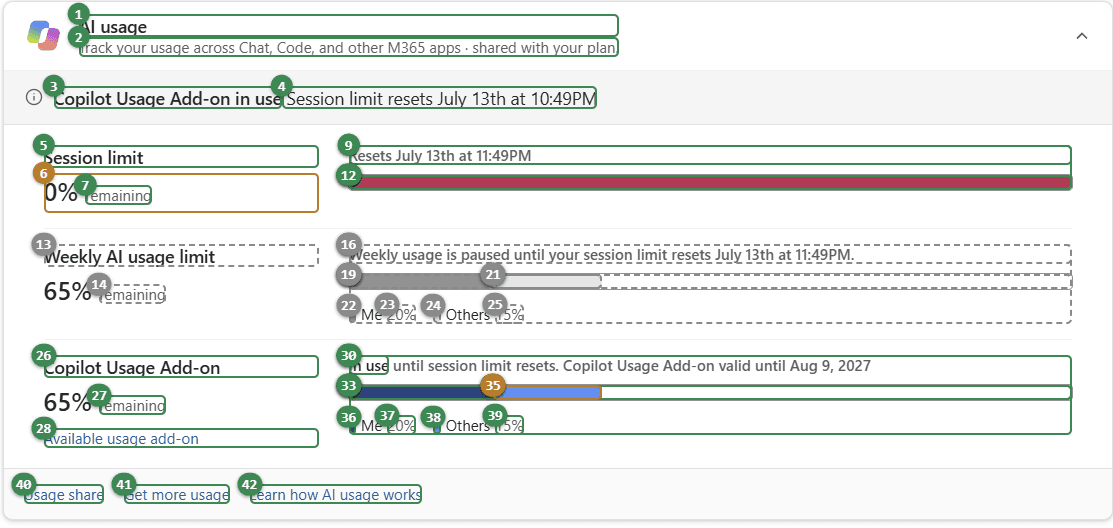
Quota anatomy
Restore the outlined track, separated segments and pill-shaped marks without changing usage values.
Evidence notes
Recorded issue: The approximation used a filled track, touching segments and square legend marks instead of the source component's anatomy.
Approval changes only the native illustration, not the evidence images or code; usage values and unrelated behavior stay unchanged.
The audit is an actual captured crop of a separate state, not a new audit pass or WCAG certification. Pins on the prototype locate topics, not defects.
Reusable guidance is an unsaved example, not model training or a repository rule; source fidelity and engineering validation still need human review.
Quota anatomy. Proposed change awaiting your approval in this demo.
06 / Follow one correction
From a marked issue to a reviewed fix.
The recording will follow one request, one annotation and one correction through human review.
Recording pending
Build. Mark. Refine. Review.
A genuine, redacted 45-60 second VS Code recording will go here.
The workflow applied / Smart Search
A real brief for the workflow.
I applied the workflow to Smart Search. The PM supplied the brief and feedback: help people find account tasks without leaving the product.
A 40-minute invoice hunt.
Family settings found via Google.
Hard-to-find billing and product keys.
PM-supplied feedback, paraphrased; directional, not representative research.
Invoice results

01 / Account actions
02 / Help, separately
Detail from the supplied prototype.
07 / Review the journey
Inspect the journey, not only the screen.
Using the supplied screens, I explored entry points, direct results and fallback states. The review had to cover what happened before a query, after it and when there was no match.
Before typing: suggest useful tasks.
After a query: show the next action.
No match: make the fallback clear.
Original prototype coverage
7 feedback scenarios
51 wired targets
Source-reported counts. The guided demo includes selected screens.
Two ways in.
In the page

Close to subscription tasks.
In the header

Available across the account.
Placement explorations, not A/B-tested outcomes.
08 / Inspect the prototype
A working artifact to review.
Six guided scenarios show the key states. Use the controls below the screen, or open the original at full size.
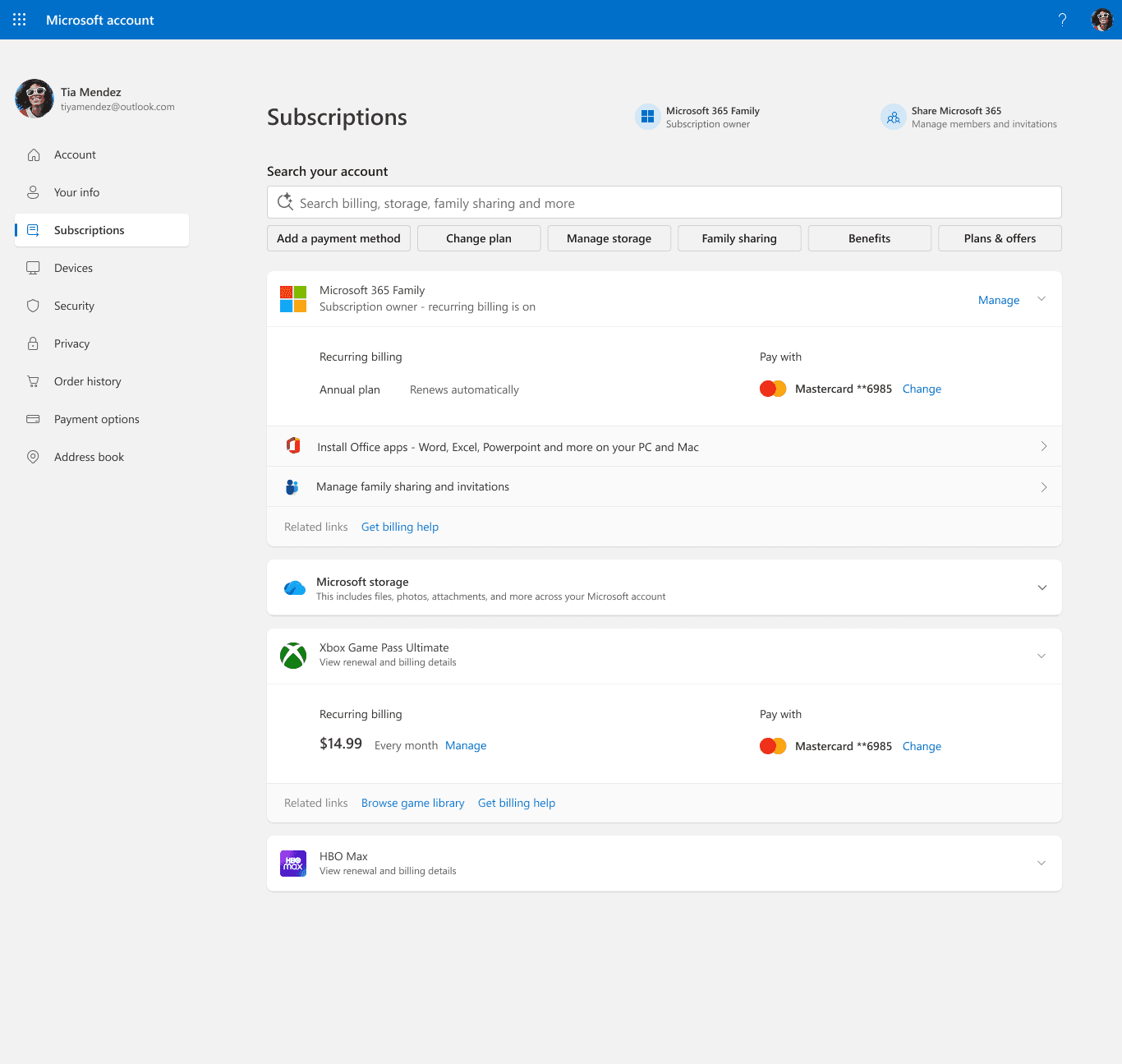 Loading the supplied landing image.
Readable guide
Search your account
No query entered
Search and topic shortcuts keep the subscriptions in view.
Guided prototype, not live search
Landing selected. No query entered.
09 / Hand over the work
The artifact and the decisions.
The handoff included the interactive prototype, React/TypeScript output and the decisions behind it. The next team could inspect the states, source references and open questions together.
Engineering still owns integration, testing and release.
Prototype
States and transitions
Implementation
Components and token references
Design context
Brief, feedback and open questions
The reported shift
Months to days.
Less rebuilding between prototype and handoff. More time for inspection and design decisions.
A qualitative project reflection, not a measured benchmark.
What I learned
Build in
the review.
The white circle made a judgment actionable: here is the issue, and here is what needs to change. My role was to design that review loop, not only the draft it produced. The next step is to measure where the workflow helps and where it still needs work.
What I would measure next
Time to first review
Revision rounds
Engineering rework
Adoption
Accessibility gaps
Evidence: build notes, prototype artifacts and PM-supplied screens and feedback. Interactive figures illustrate the workflow. Supplied Smart Search artwork is not claimed as new visual design. The Rolls-Royce inspection process is a design inspiration, not a claim of affiliation.